What is Smart Scheduling?
Smart Scheduling automatically determines the ideal moment to send a conversation to a patient.
Instead of sending the invitation immediately, the system plans the optimal time based on the consultation date.
Why is this useful?
Patients don’t receive their questionnaire too early
You can schedule conversations far ahead of time
The reminder system works optimally
How do I activate Smart Scheduling?
1. Go to the Smart Scheduling settings
Navigate to: Settings → Interactions → General → Smart Scheduling
2. Turn on the Smart Scheduling toggle
On: the system sends conversations automatically at the right moment
Off: conversations are sent immediately after creation

3. Set the number of days before the deadline
Enter how many days before the consultation you want results to be completed.
Important: The system always uses a minimum buffer of 7 days.
This ensures:
Enough time for the patient to complete the questionnaire
Correct reminder scheduling
Examples:
Set 0 days → system uses 7 days
Set 3 days → system uses 10 days
Set 5 days → system uses 12 days
When is the first invitation sent?
The first invitation is automatically sent when the consultation enters the calculated window (your chosen number of days + 7).
Example:
Consultation date: 20 November
Setting: 3 days
First invitation sent on: 10 November
How do reminders work?
After the first email is sent, the usual reminder timings apply:
7 days before the deadline
3 days before the deadline
1 day before the deadline
What if a conversation is created close to the appointment date?
If a conversation is created within the buffer window, it will be sent immediately, even when Smart Scheduling is active.
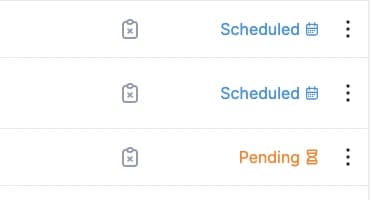
How can I recognize planned conversations?
Status: “Planned”
The conversation is created but not yet sent. The system is waiting for the optimal moment.
Status: “Pending”
The invitation has been sent and the normal flow continues.
What happens when Smart Scheduling is turned off?
All conversations that were still in “Planned” status are sent immediately
New conversations are sent directly at creation
When are Smart Scheduled conversations sent?
The system checks every morning at 07:00 and sends all conversations whose scheduled moment has arrived.